Paste / type maximum: 50 MB0.00 MB
# Methods note

We model the response as $y = X\beta + \epsilon$ and inspect residuals.

$
\hat{\beta} = (X^T X)^{-1} X^T y
$

| Variable | Description |
| --- | --- |
| y | observed outcome |
| X | design matrix |Academic drafts written in Markdown often combine section headings, citations, tables, code snippets, and LaTeX-style equations. That mix is convenient while drafting but usually needs to become a Word document for supervisors, collaborators, or institutional review.
This workflow focuses on DOCX output for academic-style Markdown. It preserves document structure, keeps tables and code readable, and converts supported LaTeX-style equations into editable Word equations rather than static images.
Citation syntax is kept as text unless your Markdown already renders it another way, so the result is best for drafts, notes, methods writeups, and reports where Word editability matters.
Need a different format? Markdown to PDF · Markdown to HTML · all formats
Need to clean up code instead? Try the free JSON, JavaScript, C++, and other code formatters.
Need to run some numbers? Try the free online calculators.
The same Markdown draft can become an editable Word document, a fixed PDF, or clean HTML. For legal and adjacent professional workflows, mdformatter also includes UK and US legal-style presets for margins, page size, spacing, and heading treatment, so lawyers, paralegals, compliance teams, consultants, and other document-heavy trades can turn structured Markdown into review-ready files faster.
mdformatter does not review or draft legal advice; it preserves and formats the document structure you provide.Open the legal Markdown to Word workflow.
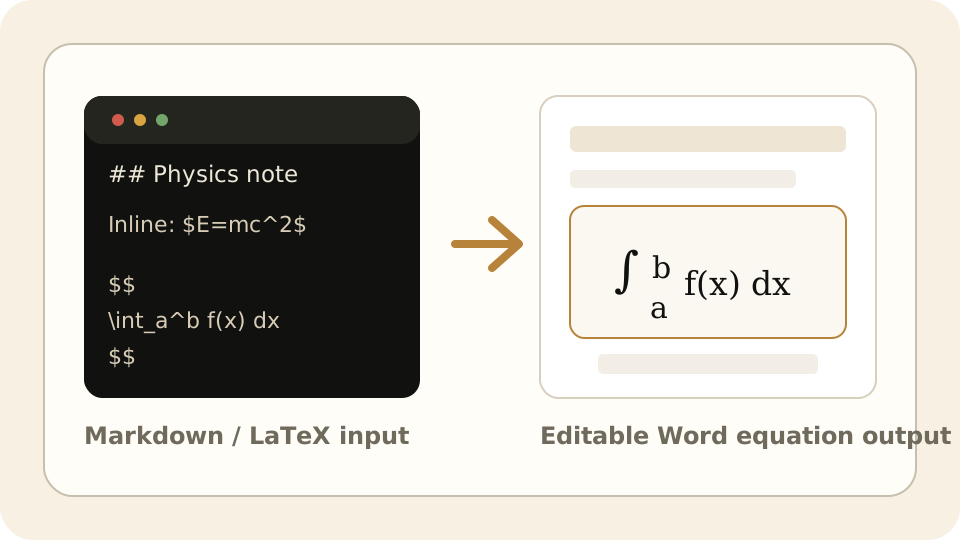
LaTeX-style math becomes editable Word equations, not flattened images.
Inline formulas and display equations stay part of the Word document so they can be selected, edited, and restyled after download.
# Methods note

We model the response as $y = X\beta + \epsilon$ and inspect residuals.

$
\hat{\beta} = (X^T X)^{-1} X^T y
$

| Variable | Description |
| --- | --- |
| y | observed outcome |
| X | design matrix |Headings, lists, blockquotes, links, and tables become real Word document elements instead of pasted Markdown syntax.
LaTeX written as $...$ or $$...$$ exports as Word-native equations that remain editable after download.
Markdown tables become Word tables, and fenced code blocks keep monospace formatting for technical documents.
Choose document settings before export, then download DOCX or create a temporary 24-hour share link for review.
Word and DOCX exports keep supported LaTeX math editable: inline math written as $...$ and display math written as $$...$$ are converted into Word's native equation format, not flattened into screenshots.
No. Citation keys or references in the Markdown are preserved as text; this workflow focuses on converting the document into editable DOCX.
Supported LaTeX-style equations become Word-native equation objects in DOCX, so they can be edited after download.
Yes. Fenced code blocks keep monospace formatting in the Word output.
We use cookies to show ads via Google AdSense. See our Privacy Policy for details.