Convert ChatGPT Markdown to Word
ChatGPT often returns useful structure as Markdown: numbered sections, bold labels, pipe tables, fenced code, and sometimes LaTeX-style math. That structure is easy to read in chat but awkward to paste directly into Word.
This workflow is tuned for taking a complete ChatGPT Markdown answer and turning it into an editable DOCX. Headings become Word headings, comparison tables become Word tables, code samples keep monospace formatting, and supported math becomes editable Word equations.
Use it when the answer is no longer just a chat reply: a brief, report, lesson plan, technical note, or client-ready draft that needs normal Word formatting.
Professional and legal-ready Markdown output
The same Markdown draft can become an editable Word document, a fixed PDF, or clean HTML. For legal and adjacent professional workflows, mdformatter also includes UK and US legal-style presets for margins, page size, spacing, and heading treatment, so lawyers, paralegals, compliance teams, consultants, and other document-heavy trades can turn structured Markdown into review-ready files faster.
mdformatter does not review or draft legal advice; it preserves and formats the document structure you provide.Open the legal Markdown to Word workflow.
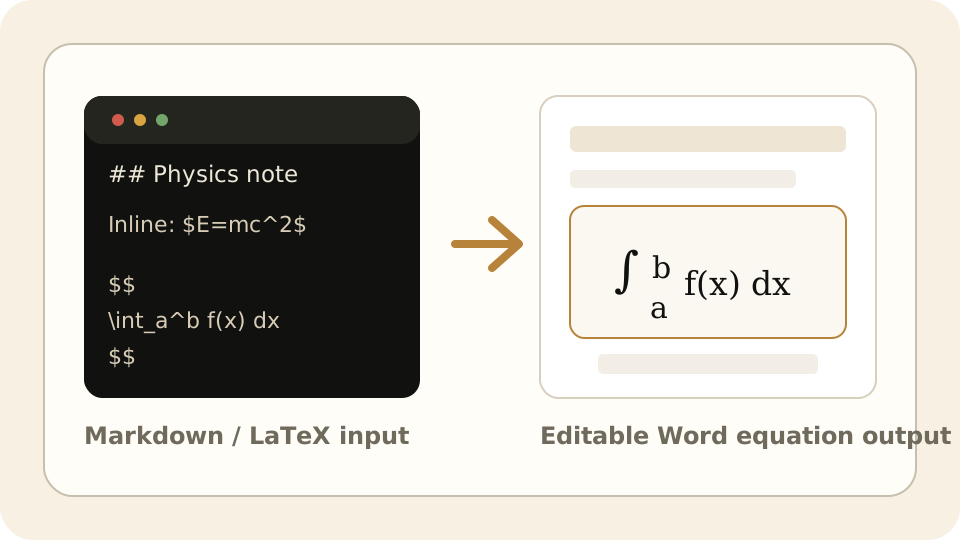
Math survives the DOCX export
LaTeX-style math becomes editable Word equations, not flattened images.
Inline formulas and display equations stay part of the Word document so they can be selected, edited, and restyled after download.
ChatGPT answer cleanup workflow
- Copy the full ChatGPT answer, including Markdown symbols, and paste it into the editor.
- Review generated headings, tables, and code blocks in the preview.
- Export DOCX so the answer can be edited, shared, or styled in Word.
Sample ChatGPT-style Markdown
# Market research summary

## Key points

1. Demand is strongest in teams with recurring reporting workflows.
2. Markdown output needs cleanup before it is client-ready.

| Audience | Need |
| --- | --- |
| Analysts | Editable report draft |
| Managers | Shareable Word summary |
How to convert Markdown to Word (DOCX)
- Paste Markdown or drop in a .md file, including headings, tables, code fences, and LaTeX math.
- Choose Word-focused settings such as page size, margins, cover page, table of contents, and header/footer options.
- Click Convert, review the preview, then download a .docx file or copy a 24-hour share link.
Features
Native Word structure
Headings, lists, blockquotes, links, and tables become real Word document elements instead of pasted Markdown syntax.
Editable Word equations
LaTeX written as $...$ or $$...$$ exports as Word-native equations that remain editable after download.
Tables and code blocks
Markdown tables become Word tables, and fenced code blocks keep monospace formatting for technical documents.
Presets and share links
Choose document settings before export, then download DOCX or create a temporary 24-hour share link for review.
Editable Word-native equations
Word and DOCX exports keep supported LaTeX math editable: inline math written as $...$ and display math written as $$...$$ are converted into Word's native equation format, not flattened into screenshots.
Frequently asked questions
Is this different from copying ChatGPT directly into Word?+
Yes. Direct paste often keeps Markdown symbols or loses structure; this converts the Markdown into native Word formatting first.
Can it handle ChatGPT tables?+
Yes. Standard Markdown pipe tables from ChatGPT convert into Word tables.
Does ChatGPT math stay editable?+
Supported LaTeX-style math written with $...$ or $...$ exports as editable Word equations in DOCX.
Related Markdown converters